
Solution · Book
A booking link customers can use anywhere
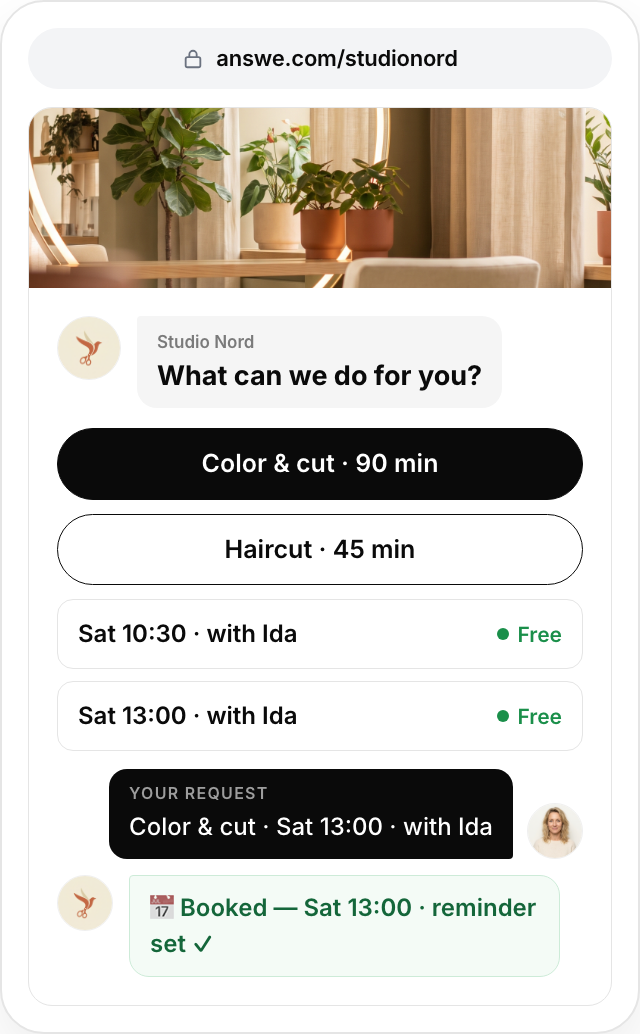
Share one link — bio, WhatsApp, email or a QR at the door. Answe helps the customer pick the right service, person or slot, saves it as a real reservation on your phone and keeps the chat open for changes. No website needed.
Free to get started, no card. You only pay when it brings you results. Share it in your bio, WhatsApp or as a QR code. No website needed.
Why Answe for bookings
The right service before the calendar
A few guided questions narrow tables, rooms, treatments or tours to the one that fits — no scrolling a list of things that don’t.
Your availability rules
Opening hours, lead times, buffers and capacity live in one availability calendar the widget enforces automatically.
Deposits and reminders built in
Collect a deposit through Stripe at booking time and send automatic reminders to cut no-shows.
Every booking is a chat
Changes, questions and follow-ups happen in the same thread — on your website, in the Answe app, without a phone call.
Rather have us build it?
Tell us about your business. We set your link up for free this week and send it to you ready to share.
How it works
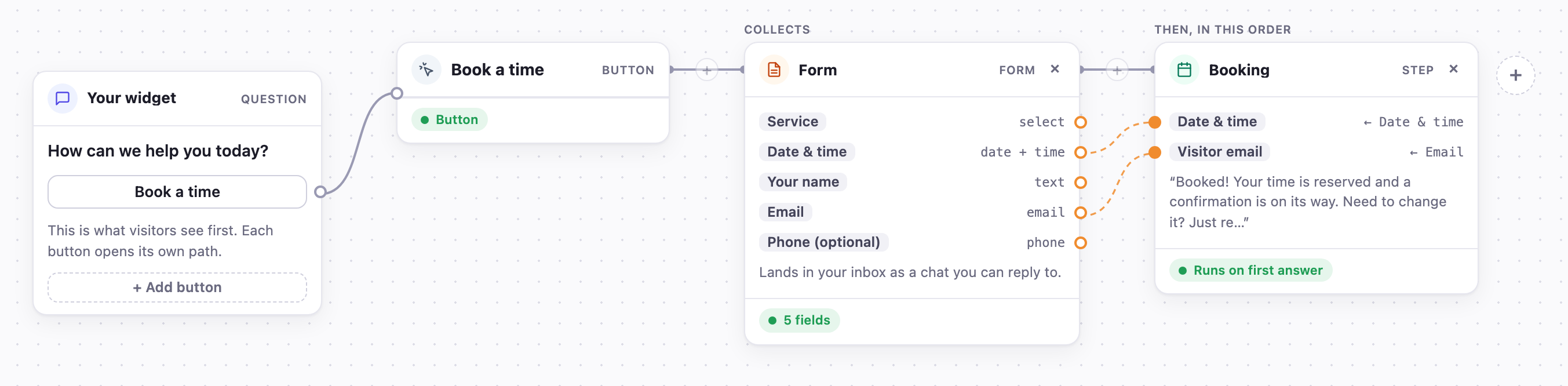
This is the whole setup for this path, as you see it in the Answe builder. Add a payment, a reminder or an AI agent with one click.
- A visitor taps “Book” on your website, link or QR code.
- Answe asks what they need and which option fits, then shows only the matching availability.
- They pick a slot, pay a deposit if you ask for one, and get a confirmation in the chat.
- The booking lands in your inbox and calendar; reminders go out automatically.
See it for your business
Coworking Spaces
Tours, desks, meeting rooms and day passes — booked in a chat.
Learn more →Restaurants & Cafes
Reservations and table orders, no per-cover fees.
Learn more →Service Businesses
Salons, studios, clinics and consultants: the right appointment, first time.
Learn more →Sports Clubs
Practice RSVPs and match-day headcounts that keep count.
Learn more →Creators & Coaches
Paid calls and sessions from one link in bio.
Learn more →Trusted by businesses in Helsinki and beyond


Free to start. Pay only when you see results.
Frequently asked questions
Can Answe stop double bookings?
Yes. The availability calendar tracks capacity per resource and time slot, so a slot that is taken is no longer offered.
Can I take a deposit?
Yes. Connect Stripe and require a deposit or full payment at booking time. Payouts go straight to your own Stripe account.
Does it work with my existing calendar or reservation system?
Bookings arrive in your Answe inbox and can be forwarded by webhook or email to other systems on paid plans. Some customers keep their existing reservation system and use Answe as the conversational front desk in front of it.
Do guests need an app?
No. They book in the browser — on your site, a shared link or a QR code — without creating an account.
One link. Fewer back-and-forth messages.
Customers ask. Answe acts. Free to get started, no credit card. You only pay when you see results.
Create my free link