
Use case
Restaurant Widgets — Menus, Reservations & Online Ordering
One chat for bookings, takeaway orders and menu questions — on your own website. Every reservation opens a conversation you can keep. No app, no login required for guests.
Free plan. No credit card required.
Why Answe for Restaurants & Cafes
Reservations without the middleman
Take bookings directly on your site, no per-cover fees.
Menus that convert
Show today’s menu, specials and photos inside the widget.
Orders straight to staff
Every order lands in the staff Orders app on the kitchen tablet or any phone, with a bell and order detail.
Payments included
Collect payment via Stripe right inside the widget at checkout.
Scan the QR, order from the table
Each table gets a printed QR code. Guests scan, browse your menu inside the widget, and pay — no app, no waiter needed.
Payouts straight to your account
Stripe Connect routes money directly to your bank. No marketplace cut, no delayed settlements.
Free POS app for your staff
Open a link on any phone or tablet, add it to the home screen, and your whole team gets a live order queue — bell alerts, one-tap status updates, no hardware required.
How Bierhaus uses Answe

Bierhaus
Restaurant and terrace in Helsinki
- A guest scans the QR code on their table — the widget opens in their browser with the table number already set. No app, no login.
- They browse the menu inside the widget — draft beers, wines, smash burgers, mains — and send the order.
- The kitchen confirms the order on an Android tablet running Answe’s free staff app.
- The guest pays through Stripe in the same chat, and the order is delivered to their table.
- The guest gets an email receipt of the whole chat — and the conversation stays active, so any question about the order continues in the same thread.
One platform covers both sides of the terrace: guests order from a QR code, the kitchen runs the queue on a tablet — no POS integration needed.
Read the full story →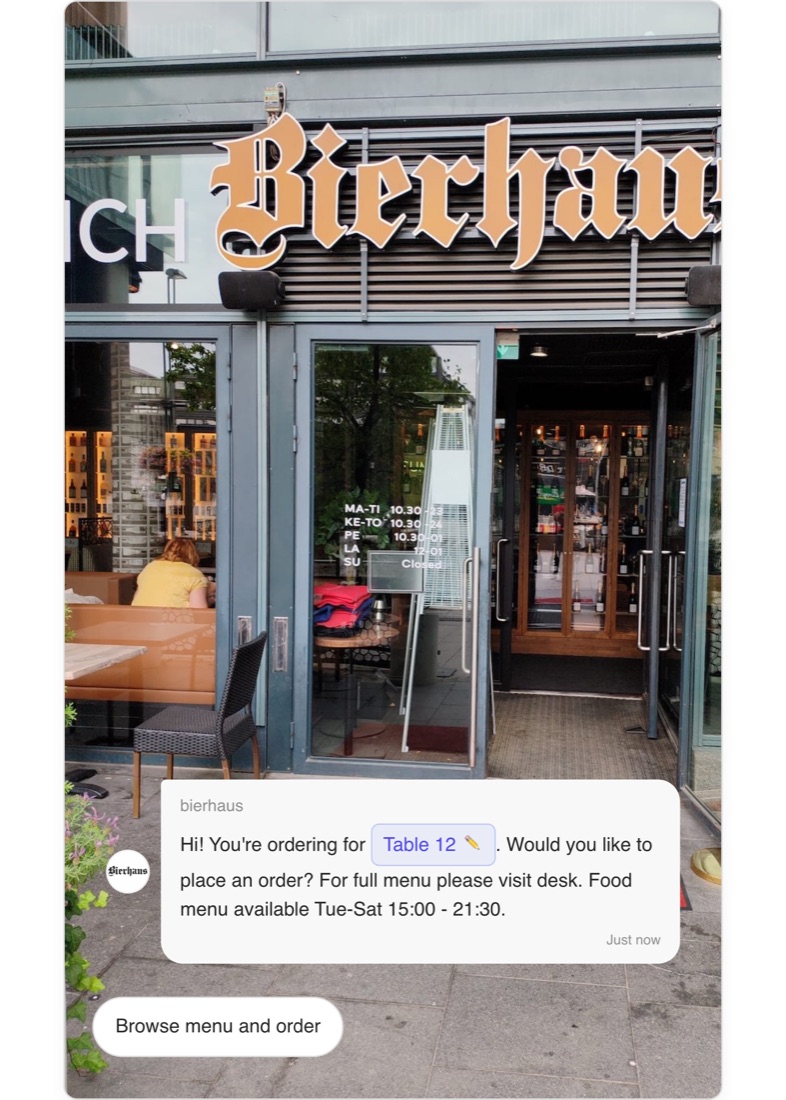
Done for you
Don't want to build it yourself?
We load your prices, build the booking or ordering flow, test it with you and deliver a link and QR ready to share within a week.
How it works
Restaurants & Cafes — Online Ordering, Menus, and Table Reservations
Introduction
Answe gives restaurants and cafes a complete digital ordering and reservation system at one link — answe.com/yourname — with a QR code for the counter or the table. It can optionally be embedded on your website too. Customers browse your menu, place orders for dine-in, takeaway, or delivery, and reserve tables — all from one widget.
How It Works
Online Ordering
Add an Order flow to your link with your full menu:
- Menu categories — Organize items into Drinks, Mains, Snacks, Desserts
- Size options — Offer Small, Medium, Large with different prices
- Browse and search — Customers find what they want quickly
- Cart — Add multiple items, adjust quantities
- Ordering mode — Table number, delivery address, or pickup
- Checkout — Secure card payment with order confirmation
QR-to-Table Ordering
Place a printed QR code on each table. When a guest scans it, the widget opens in their browser pre-tagged with that table's number — no app, no login, no waiter required to take the order:
- Guest scans the QR at the table
- Widget opens in the browser showing your menu, tagged to that table
- Guest adds items to cart and pays by card
- Order arrives in your staff inbox already labelled with the table number
- Staff deliver to the table — no POS integration required
Payouts go directly to your Stripe account via Stripe Connect. Answe does not take a cut of the transaction.
Staff Orders App
Every Answe account comes with a free staff app at answe.com/ordersapp. Open the link on any phone or tablet, tap "Add to Home Screen", and it sits on the screen like any downloaded app — no app store, no subscription, no hardware to buy.
Here is what your team gets:
- One login per device, all devices in sync — log in once on the kitchen tablet, the bar phone and the manager's screen. Every device sees the same order queue at the same time.
- Instant new-order alert — the moment a guest checks out through your website or scans a table QR to order, the app rings a bell and shows a full-screen "New order!" splash. Paid orders ring louder so a confirmed takeaway or table order never gets buried.
- Full receipt at a glance — tap the order to see every item, modifier (size, extras), the table number from the QR scan and the amount paid.
- Five-button order lifecycle — Accept, Reject, In progress, Ready, Delivered. Tap once and every device on your account flips to the new status instantly.
- Active and All tabs — Active shows the live queue with a count so the kitchen always knows how deep the backlog runs. All shows the day's complete history.
- Pause orders in one tap — the Available / Unavailable switch on the Profile screen closes ordering when the kitchen is slammed or done for the night. Flip it back when you're ready and new orders start flowing again.
- Reconnects on its own — if the Wi-Fi drops for a moment the app picks back up without your staff having to touch anything.
A €100 used Android tablet on the bar shelf is all the hardware you need to run a fully digital ordering operation.
Table Reservations
Add a booking widget for table reservations:
- Customer selects a date from the calendar
- Available time slots shown for that date
- Customer picks a time and party size
- Fills in name and contact info
- Reservation confirmed instantly
Buffer time between reservations ensures staff can prepare.
Menu Display
Show your menu as an interactive, browsable catalog instead of a static PDF. Customers can:
- Filter by category
- See prices and descriptions
- View product images
- Search for specific items
Real-World Scenarios
Pizza restaurant: Customers select pizza size and toppings, specify dine-in table or delivery address, and pay by card.
Cafe: Morning visitors order coffee and pastries for pickup. The widget shows estimated wait time based on the queue.
Fine dining: Guests browse the tasting menu, make a reservation for a specific date and time, and note dietary requirements in the form.
Beer hall / high-volume bistro: Each table has a laminated QR card. Guests scan and browse a visual catalog of drinks and bar food. The widget resolves the table number from the QR link automatically, so every order arrives in the staff inbox tagged "Table 4" or "Table 12". Bartenders fill the order and walk it over — no dedicated waiter per table needed. Payment is collected at order time via card, reducing end-of-night cash handling entirely.
Key Benefits
- No third-party delivery app fees — Direct ordering through your own link or website
- Table and delivery — Support both dine-in and takeaway
- Real-time availability — No double-booked tables
- Menu management — Update menu items, prices, and availability instantly
- Order history — Track all orders in your inbox
- Mobile-friendly — Customers order from their phones at the table
Getting Started
- Go to answe.com/start, choose Place an order (or Book a time for reservations) and describe your restaurant — test the flow, then claim your link (or start from the restaurant template in the gallery)
- Add your menu items with categories and prices
- Set up table reservations with your hours
- Share your link and print the QR — download the page QR, the Order flow's own QR, or the printable table QR sheet
- Optional: embed the same flow on your website
- Open
answe.com/ordersappon your kitchen tablet or staff phone, log in, and add it to the home screen - Start receiving orders and reservations — the bell rings on the staff app the moment a guest checks out
Related
- Online Store — Set up your menu
- Reservations & Booking — Table bookings
- Payments — Accept card payments
- Availability Calendar — Set restaurant hours
Manage it all on the go
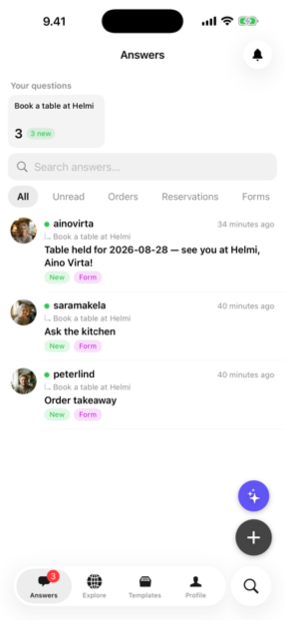
Every answer, booking and lead lands in the Answe app — reply from your phone before the competition even checks email.
Trusted by businesses in Helsinki and beyond

Every plan takes bookings. Pay for volume, not features.
Frequently asked questions
Can guests reserve without creating an account?
Yes. Visitors can book, order and message without signup. You only collect what you ask for.
Does it work with my existing website?
Yes. Paste a single embed snippet on any page — WordPress, Squarespace, Wix, custom HTML.
What about payments?
Connect Stripe and collect payment on reservations and orders, right inside the widget.
Can I show different menus for lunch and dinner?
Yes. Set availability rules so the widget shows the right menu by day and time.
Can guests order from their table without an app?
Yes. Print a QR code for each table. When a guest scans it, the widget opens in their browser pre-tagged with their table number. They browse, order and pay without downloading anything or creating an account. The order arrives in your staff inbox already labelled with the table.
Where does the payment go?
Directly to your bank via Stripe Connect. Answe never holds your funds or takes a cut of the transaction — the connection is between your Stripe account and your customer.
How do staff see the orders?
Open answe.com/ordersapp on any phone or tablet, tap "Add to Home Screen", and it works like a downloaded app — no app store required. Staff log in once per device and the kitchen tablet, bar phone and manager screen all show the same live queue. The moment a guest orders, every device rings a bell and the order appears within a second. Tap Accept, In progress, Ready or Delivered and every screen on your account updates instantly.
Try Answe for Restaurants & Cafes
Free plan, no credit card. Set up your first widget in minutes.
Start free